

How the 33-inch Display and Google built-in Make Denver, CO Drives Effortless in the 2026 Cadillac CT5
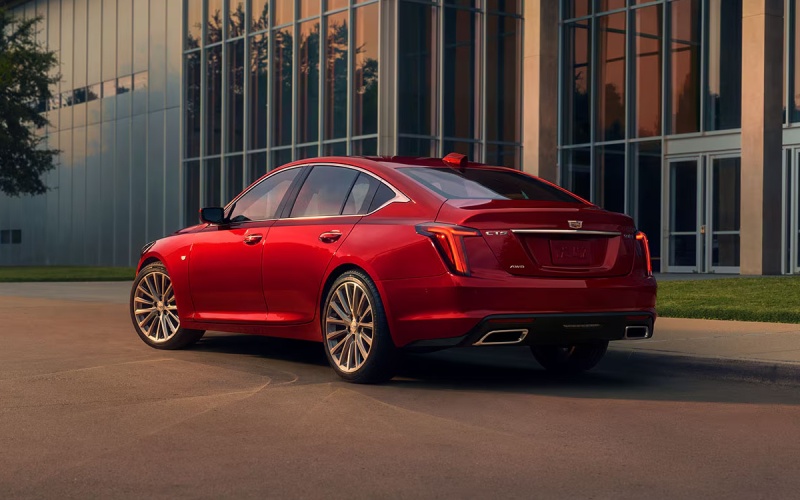
Rickenbaugh Cadillac – How the 33-inch Display and Google built-in Make Denver, CO Drives Effortless in the 2026 Cadillac CT5
When you slide into the 2026 Cadillac CT5, the first thing that captures your eye is the sweeping 33-inch diagonal Advanced LED Display. It isn’t just a bigger screen—it’s a single, elegant pane that brings together vital driver information, navigation, media, and vehicle settings in a way that’s clean, consistent, and genuinely helpful on Denver, CO roads. Add Google built-in and 5G Wi-Fi hotspot capability, and you get a polished, voice-ready interface that simplifies your day, from navigating I-25 traffic to finding the best coffee near Union Station.
Why a Panoramic Interface Matters for City and Highway Driving
Most sedans scatter displays and menus across separate panels. The CT5’s 33-inch diagonal Advanced LED Display centralizes everything, so you glance less and see more. In stop-and-go on Speer Boulevard, the main driver cluster keeps speed, safety alerts, and lane guidance clearly visible. As you merge onto I-70 for a weekend escape, a wide-format navigation view expands across the display—big, legible, and easy to follow at a glance. The benefit is tangible: fewer taps, less menu diving, and a smoother mental transition from city streets to open highway.
This approach also resolves an everyday frustration—switching between navigation, media, and phone calls. In the CT5, prioritization is smartly handled. You keep navigation and driver data front-and-center while your playlist or podcast controls live exactly where you expect them. The layout feels purpose-built for how people actually drive in Denver, rather than making you adapt to a cluttered interface.
Google built-in: Voice-Forward Simplicity
With Google built in, the learning curve is minimal. Your voice doubles as a command center: “Hey Google, navigate to the Denver Botanic Gardens,” or “Hey Google, play my commute playlist on Spotify.” You can adjust the climate, find a quick charge for your phone, call a client, or get a detour suggestion around a closure on 6th Avenue—all without taking your hands from the wheel. For riders, casting content or connecting devices to the 5G Wi-Fi hotspot capability is quick and reliable, so meetings, homework, or streaming can continue uninterrupted.
The advantage is not just convenience—it’s consistency. The apps and voice assistant you already use carry over to the CT5 experience. That continuity trims distractions and helps you stay focused on the road during busy Denver commutes, where quick decisions and clear directions make all the difference.
Display Clarity Meets Cabin Serenity
A great screen is even better in a quiet, comfortable cabin. The CT5’s thoughtful materials and seating make the display feel like part of a coherent whole. Heated and massaging front seats—with available ventilation—combine with low wind and road noise to keep conversations clear and the visuals easy on the eyes, even after a long day. When you cue up an evening drive along Cherry Creek or head toward Golden for dinner, the available AKG Studio Audio system floods the cabin with detail and presence. Whether you love live recordings, audiobooks, or podcasts, the CT5’s tech suite reshapes the way you enjoy content on the move.
The result is a cockpit that feels like a well-designed workspace and a living room rolled into one—clean, intuitive, and comfortably refined. Every touchpoint reinforces the idea that technology should fade into the background and simply help you enjoy the drive.
Seamless Setup and Everyday Wins
Set-up is straightforward. Pair your profile, sign into your Google account, and watch your preferences carry over automatically—maps, voice commands, and media services feel familiar right away. If you share the CT5, profiles help keep settings, seat positions, and app layouts organized. You can step in, say “Hey Google, take me to the office,” and go—no fuss, no hunting for menus.
- Profile-based personalization: Save seat and interface preferences for multiple drivers.
- Voice-led navigation: Fast, clear routing across the Denver metro area.
- App continuity: Google apps and services function as you expect.
- Reliable connectivity: 5G Wi-Fi hotspot capability for on-the-go productivity or streaming.
That combination pays dividends during the workweek and on weekend getaways. It’s especially helpful across Denver’s variable driving—from tight downtown turns and construction zones to longer stints on I-25, E-470, and I-70. The interface scales seamlessly to each scenario, maintaining clarity and calm.
Where Available Super Cruise® Fits In
While the focus here is the interface, it’s worth noting how the CT5’s available Super Cruise® fits into the tech story. When equipped, the system works with compatible mapped roads and an attentive driver to provide hands-free driving support. On longer hauls up the Front Range, the synergy is obvious—guidance, status, and mapped-lane visuals appear clearly on the display so you always know what the system is seeing. If your days routinely include busy stretches on I-25 or E-470, the pairing of a great interface with this available technology helps make travel less tiring and more predictable.
Ownership Confidence and Easy Learning
Some drivers worry that big screens are complicated. In the 2026 CT5, the layout, fonts, and graphics are clean, and the learning curve is gentle. You can keep the interface simple to start—basic navigation, audio, and phone—and gradually explore deeper features as you get comfortable. The consistency of Google built-in helps a lot; if you’ve used a smartphone, you will feel at home in minutes.
Local drivers also appreciate how the CT5’s tech feels durable and thoughtfully integrated. The display is not an afterthought; it is the anchor of a cohesive cabin design. Materials, trim, and lighting frame the display without glare or distraction. Even after a long day of meetings and a late return through LoDo, the cabin stays composed, and the screen remains easy on the eyes.
Frequently Asked Questions:
Does the 2026 CT5 support voice navigation without plugging in a phone?
Yes. With Google built in, you can say “Hey Google” and get directions, find nearby fuel or food, and reroute around congestion—no phone connection required for core features.
Can I keep navigation up while changing music?
Absolutely. The 33-inch diagonal Advanced LED Display allows you to see navigation while adjusting audio or taking a call, minimizing the need to switch screens.
Is the available AKG Studio Audio worth it for daily driving?
If you value clarity and immersion, it is a standout upgrade. The system delivers crisp detail at low volumes for calls and podcasts, and rich dynamics when you turn it up.
How does this setup help in Denver traffic?
The clear, centralized layout reduces tapping and searching during congested stretches. Voice controls streamline common tasks, so you can keep your attention on changing conditions around you.
In a market full of luxury sedans, the 2026 Cadillac CT5’s interface is more than a showpiece—it’s a thoughtful tool designed to simplify Denver, CO driving. With the 33-inch diagonal Advanced LED Display, Google built-in, and available Super Cruise® working in harmony, you get a sedan that feels tailored to your routine, whether that’s gliding through downtown or settling into a quiet lane on I-70 toward the foothills. At Rickenbaugh Cadillac, we are proud to support drivers seeking technology that actually makes life easier, serving Denver, Englewood, and Greenwood Village with a refined, modern approach to luxury that puts you in command from the first mile.
0 comment(s) so far on How the 33-inch Display and Google built-in Make Denver, CO Drives Effortless in the 2026 Cadillac CT5